
Custom Contact Forms for Magento 1
Drag‑and-drop contact form builder for Magento 1.
- v1.21.2
- Magento CE 1.4 – 1.9, EE 1.8 – 1.14
- OpenMage
- MIT License
- Released Apr 2020


Features
Front‑end features
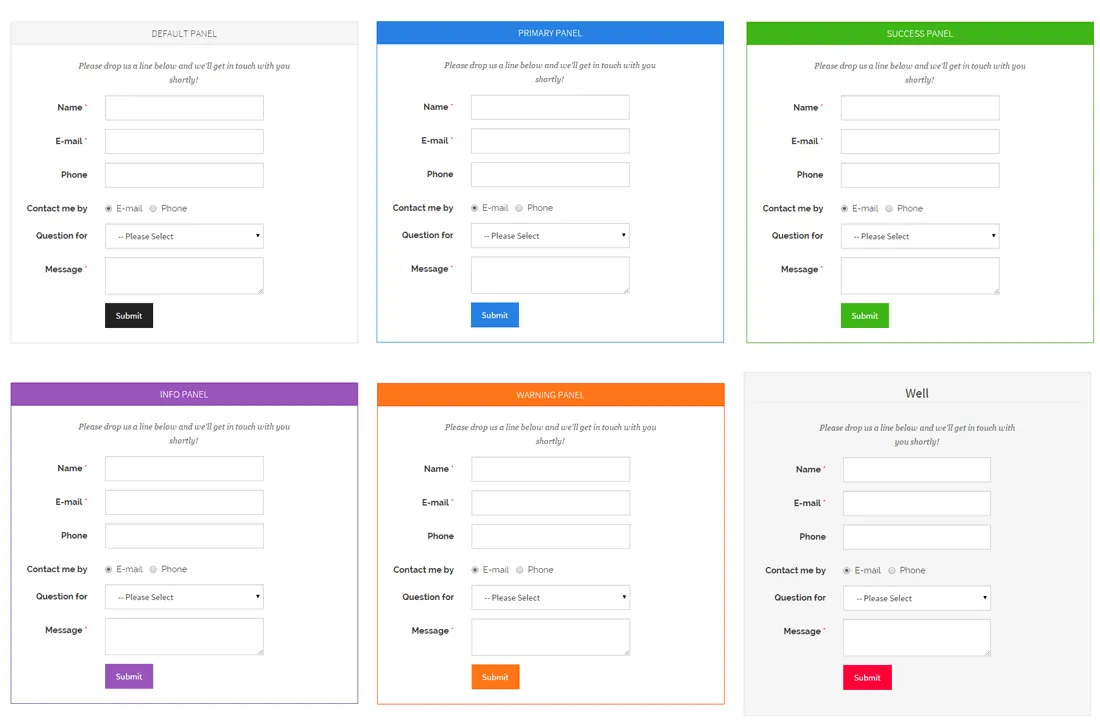
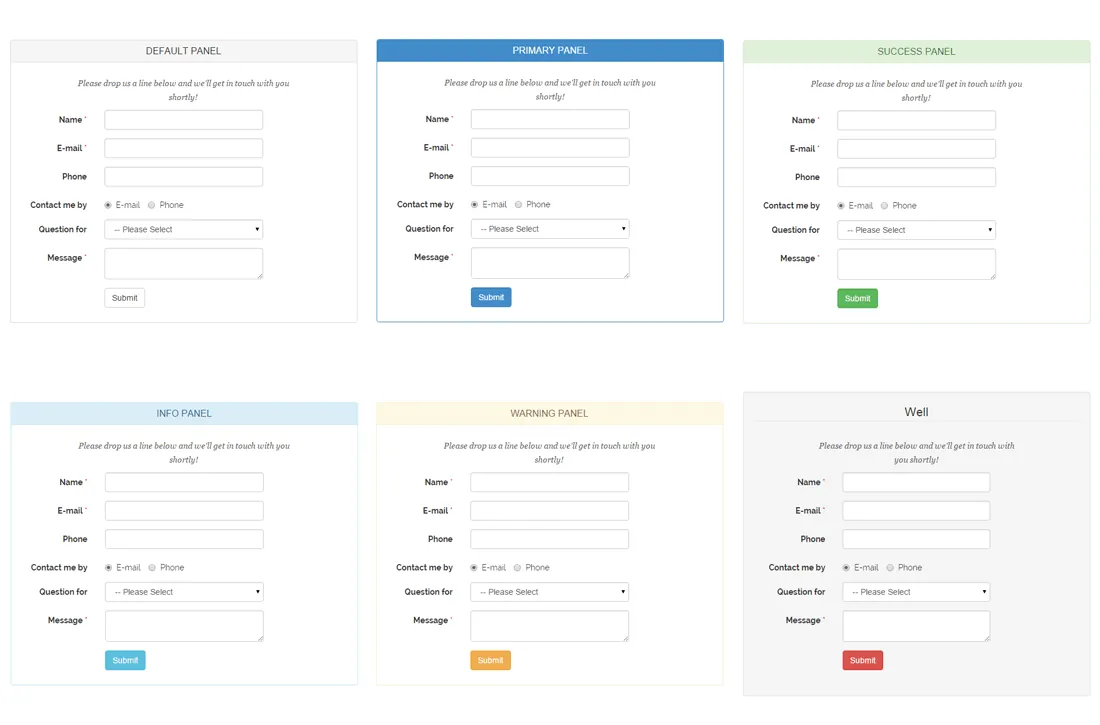
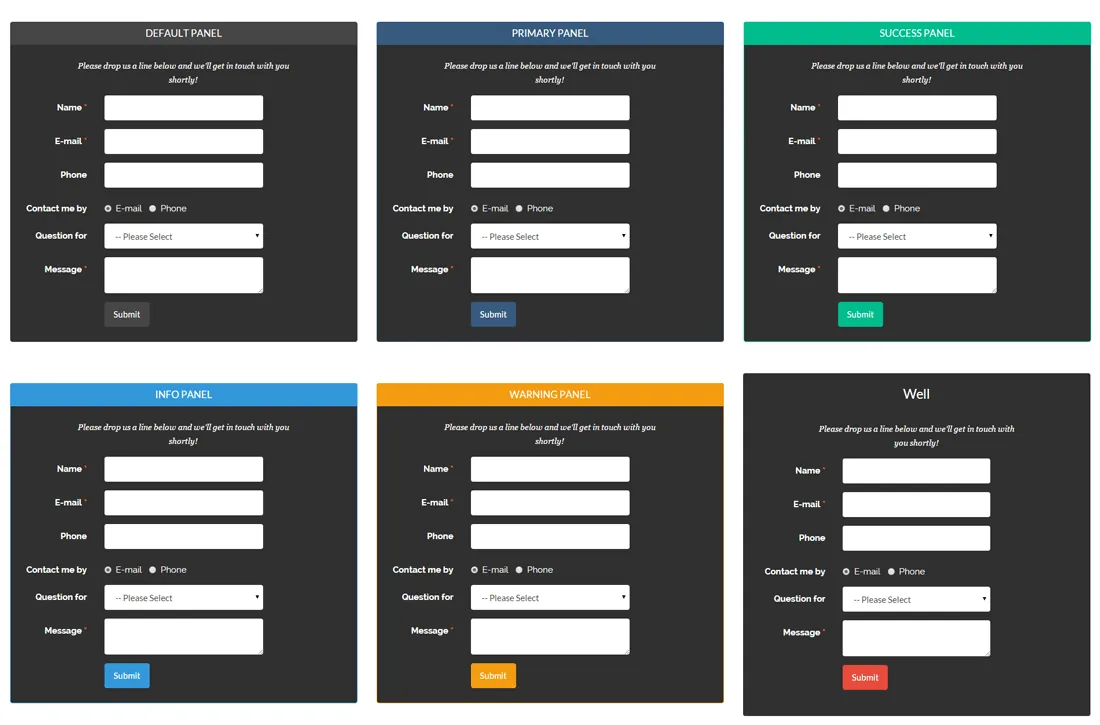
- 18 Bootstrap themes and many design options
- Responsive, AJAX-based front-end forms
- Form validation with Google reCAPTCHA or visual captcha
- Pop-up forms with optional exit intent
- Slide-out forms
- Multi-page and multi-column forms
- Conditional form fields for dynamic forms
- Pre-fill fields with customer, product and store data
Admin features
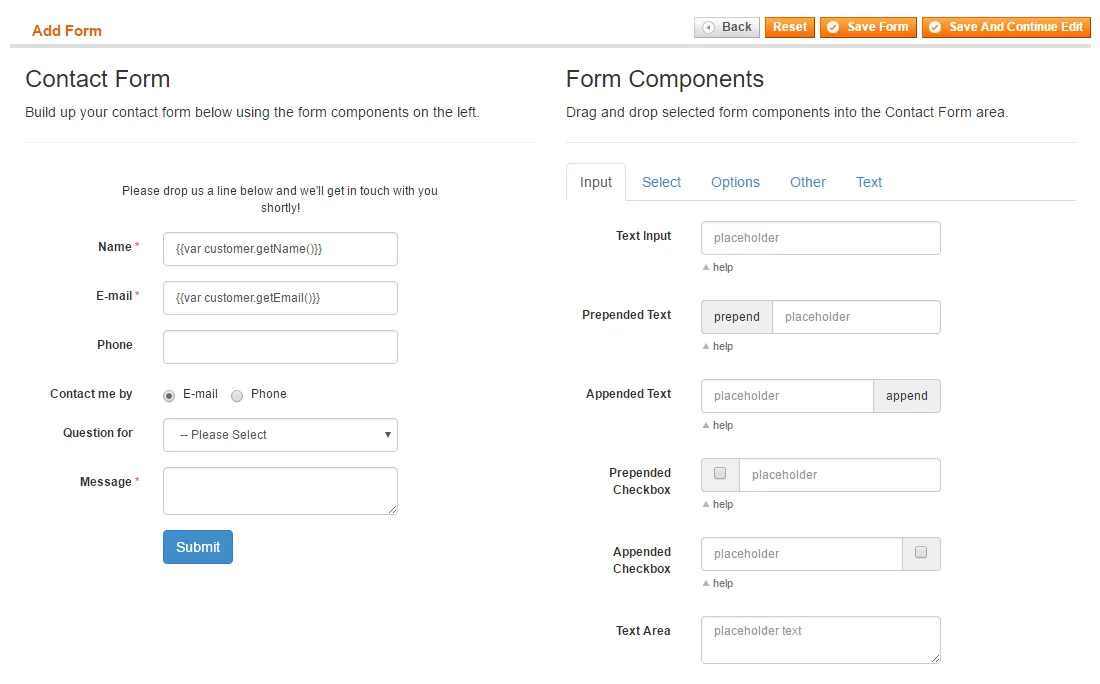
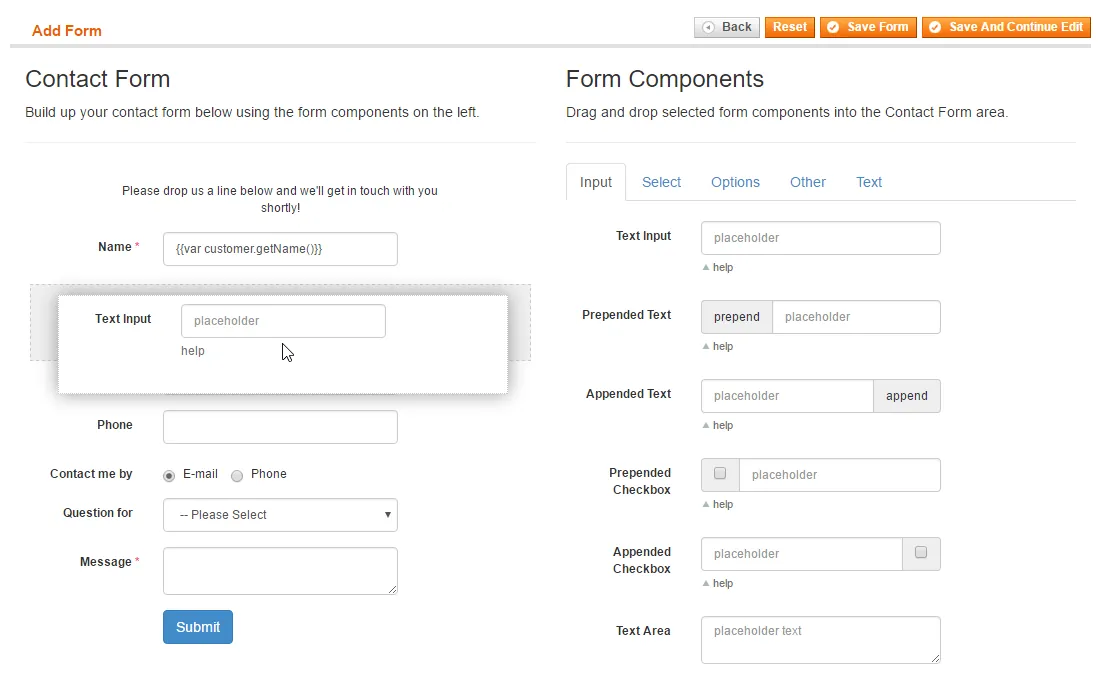
- Drag-and-drop form builder
- Wide choice of form fields, including file upload
- Optional front-end page (URL) per form
- Embed forms in CMS pages, blocks and layouts with widgets
- Customizable customer and admin e‑mail notifications
- Conditional admin notification recipients
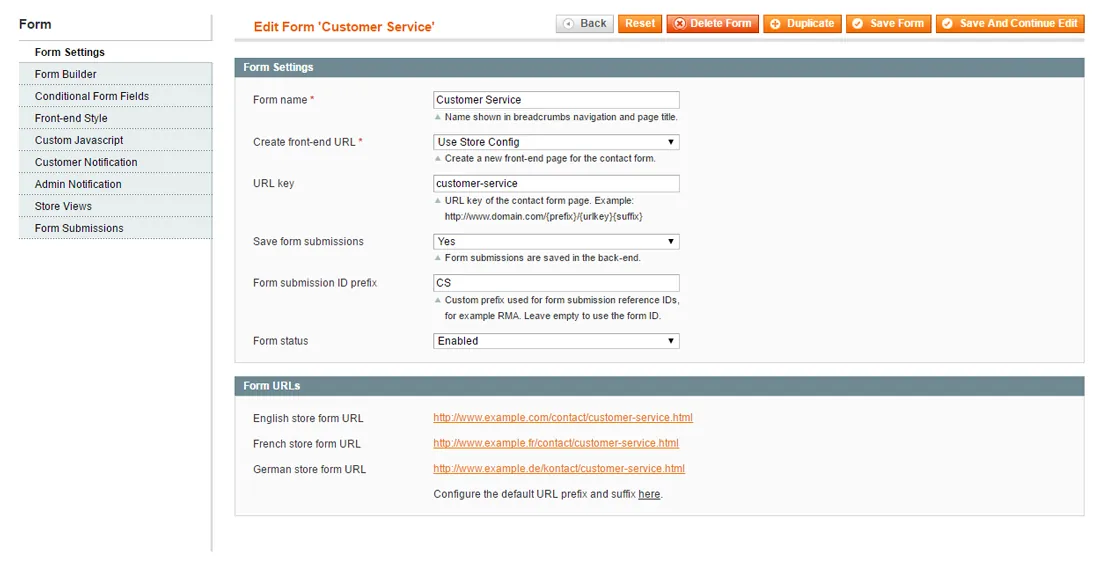
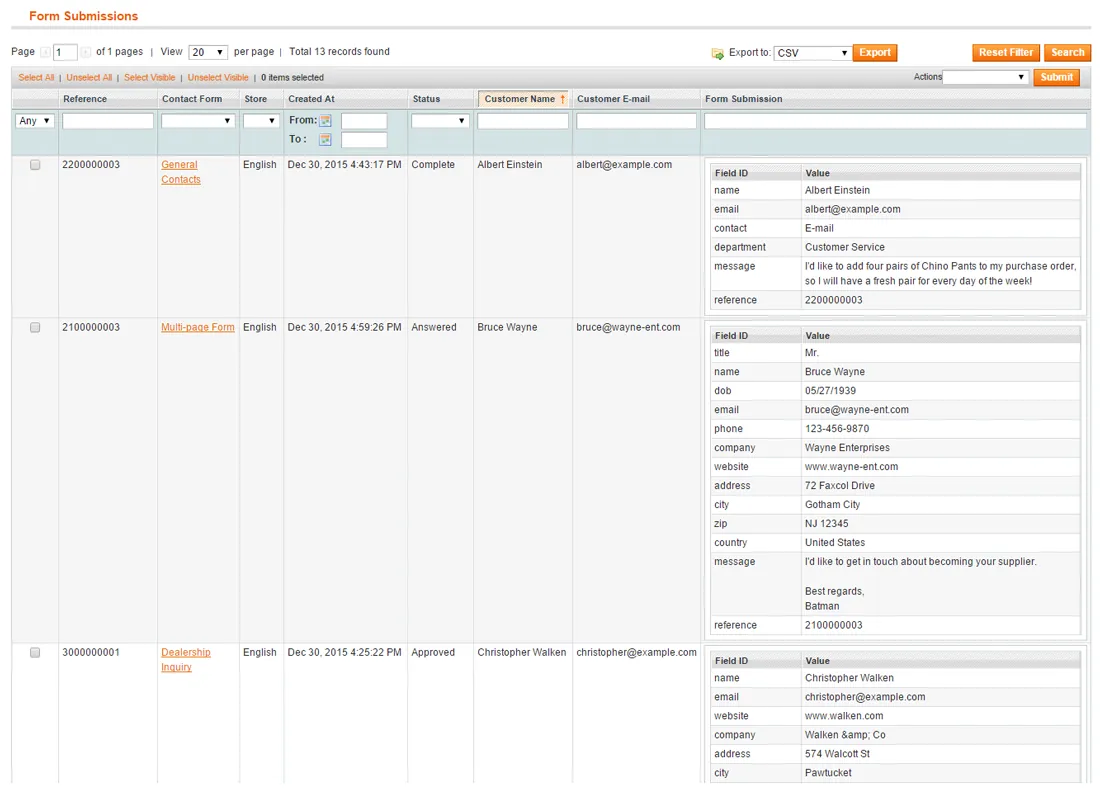
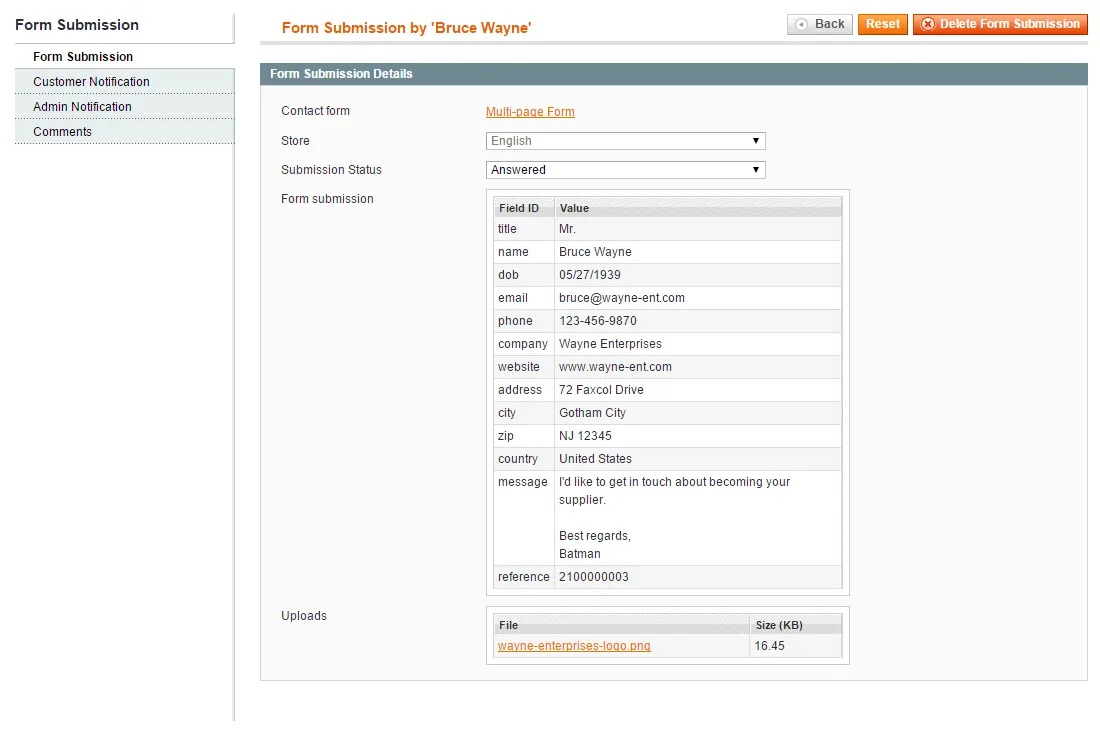
- Save, manage and export form submissions in the admin
Overview
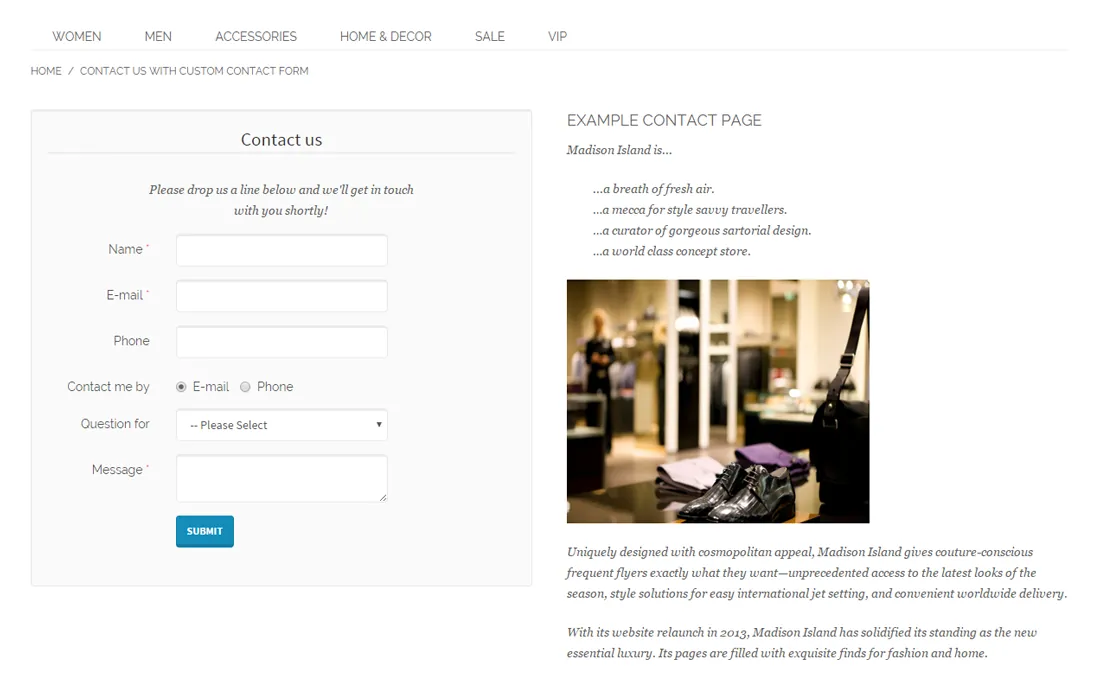
Every Magento store includes a simple built-in contact form that unfortunately cannot be modified in the back-end.
With the extension's drag & drop form builder, wide selection of form fields, 18 front-end themes and many other design and display options, you can create virtually any type of contact form, such as a sales inquiry form, RMA or quotation form, customer satisfaction survey and much more.
Simple drag & drop form builder#
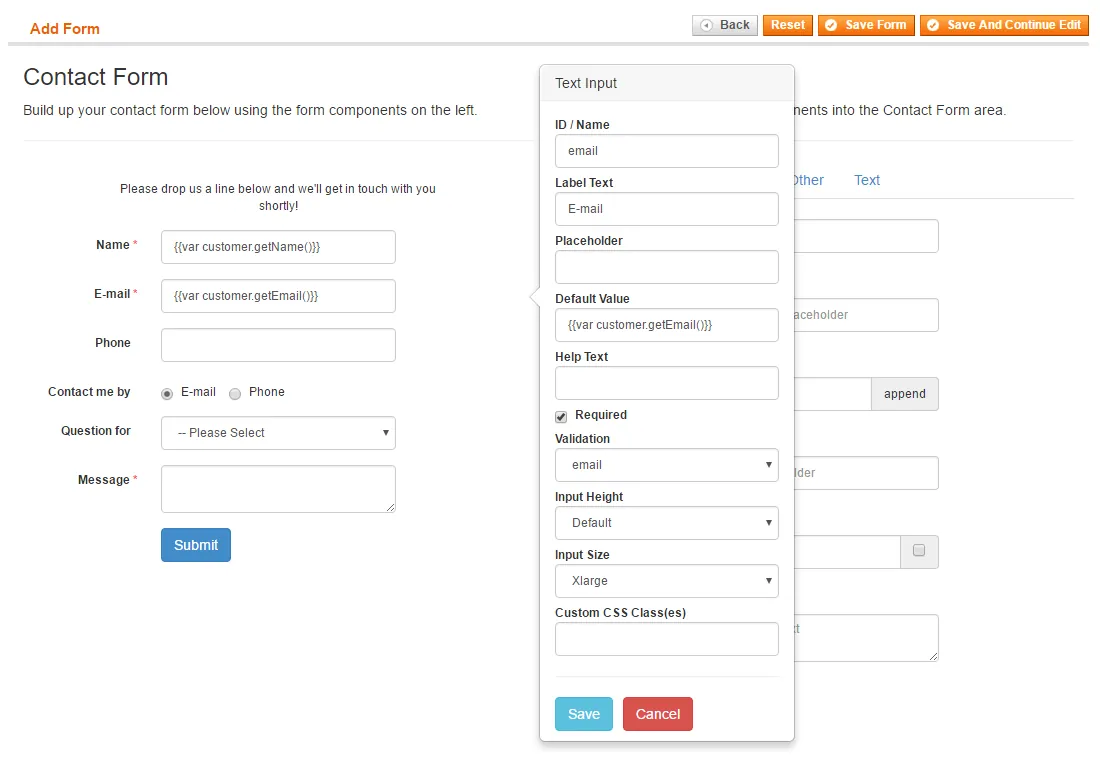
With the form builder included with the Magento Contact Form Extension, anyone can create advanced contact forms quickly. Simply drag and drop the desired form fields into the Contact Form area and configure the field's content and settings in a pop-over.
The wide selection of form components includes everything you need to customize your form according to your own specific needs. Choose from a variety of input and selection fields, radios and checkboxes, date and time pickers, buttons and text elements, a file upload field and two different Captcha types.
Integrated form validation & spam protection#
To ensure the contact forms in your Magento shop are always filled in correctly, the text input fields have a validation function for e-mail addresses, numbers, dates, URLs and much more.
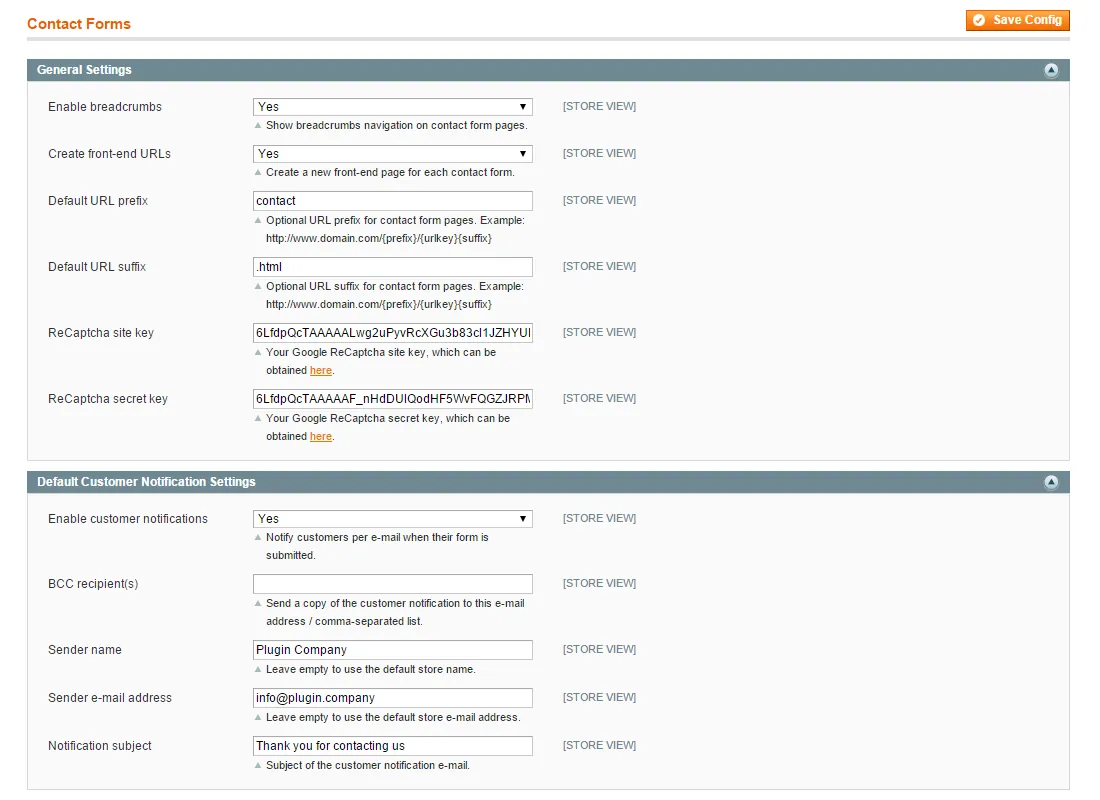
On top of that, the extension includes two integrated Captcha functionalities to protect your website against spammers and abuse: the updated Google ReCaptcha and Visual Captcha.
Read the full description
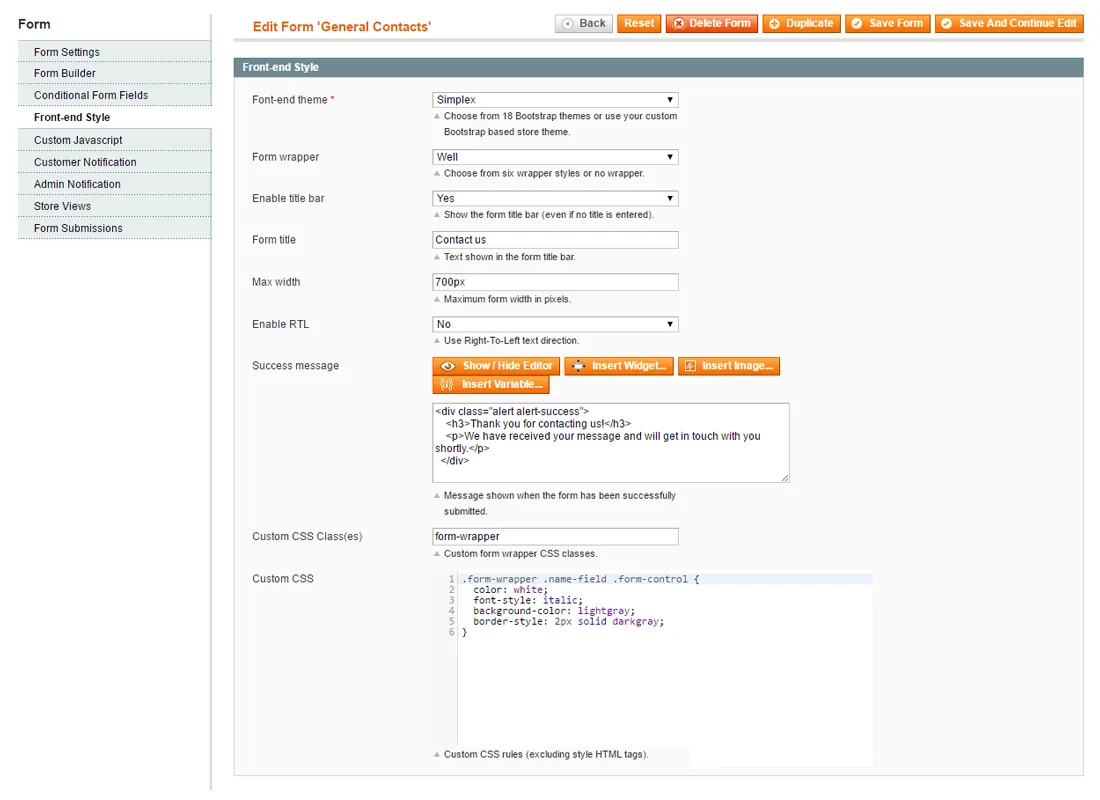
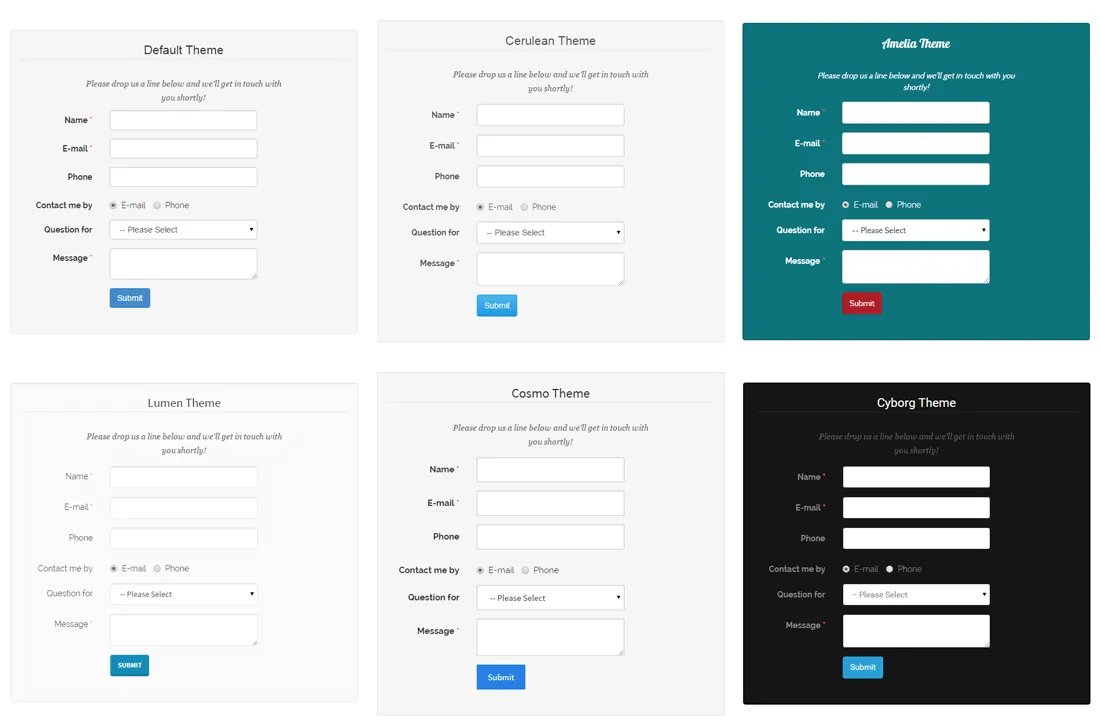
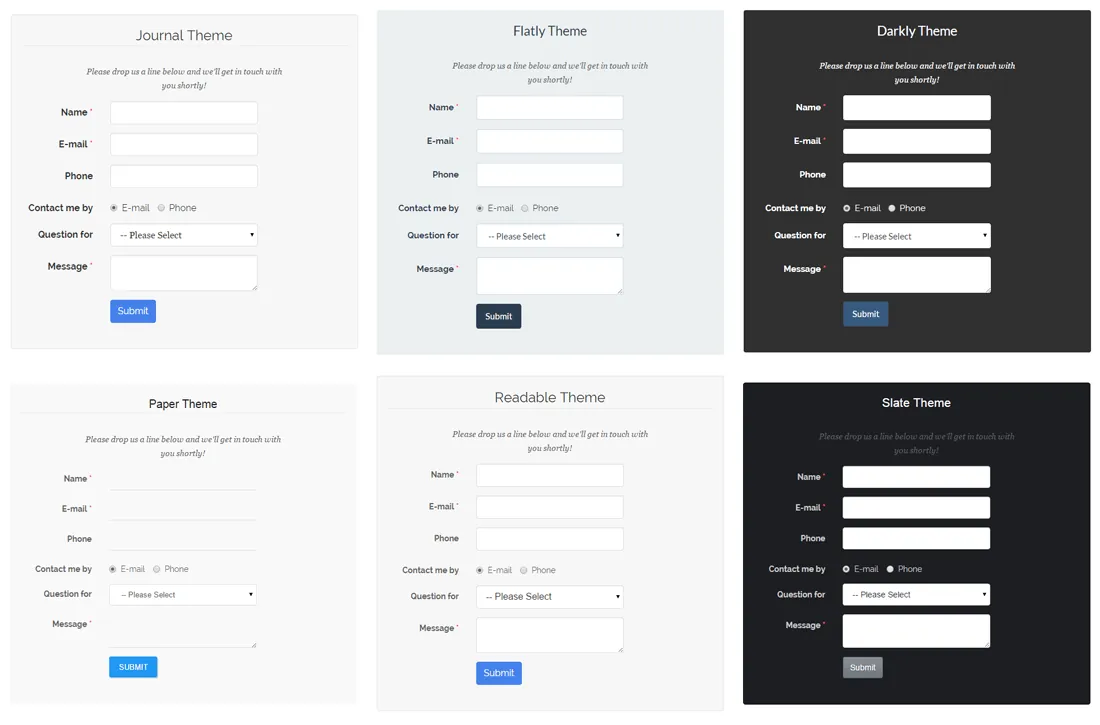
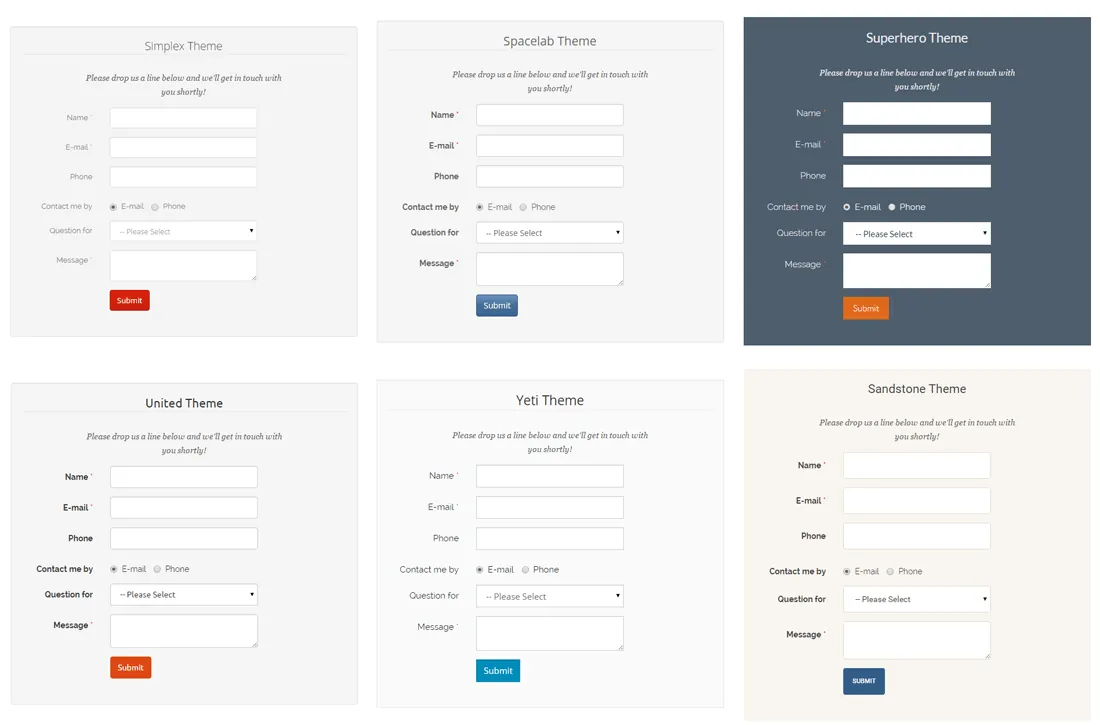
Bootstrap-based front-end themes#
The Magento Custom Contact Forms extension is built upon Bootstrap, providing you with an selection of 18 Bootswatch front-end themes.
Of course it's also possible to use your own Bootstrap-powered Magento theme.
Fully responsive AJAX-based design#
The custom contact forms created with the Magento extension have a fully responsive front-end design, making your forms look great on any device, whether it's a mobile phone, laptop or tablet.
Besides that, the contact forms are 100% AJAX-based, which means that pages don't have to reload when a form is submitted.
Contact form widgets#
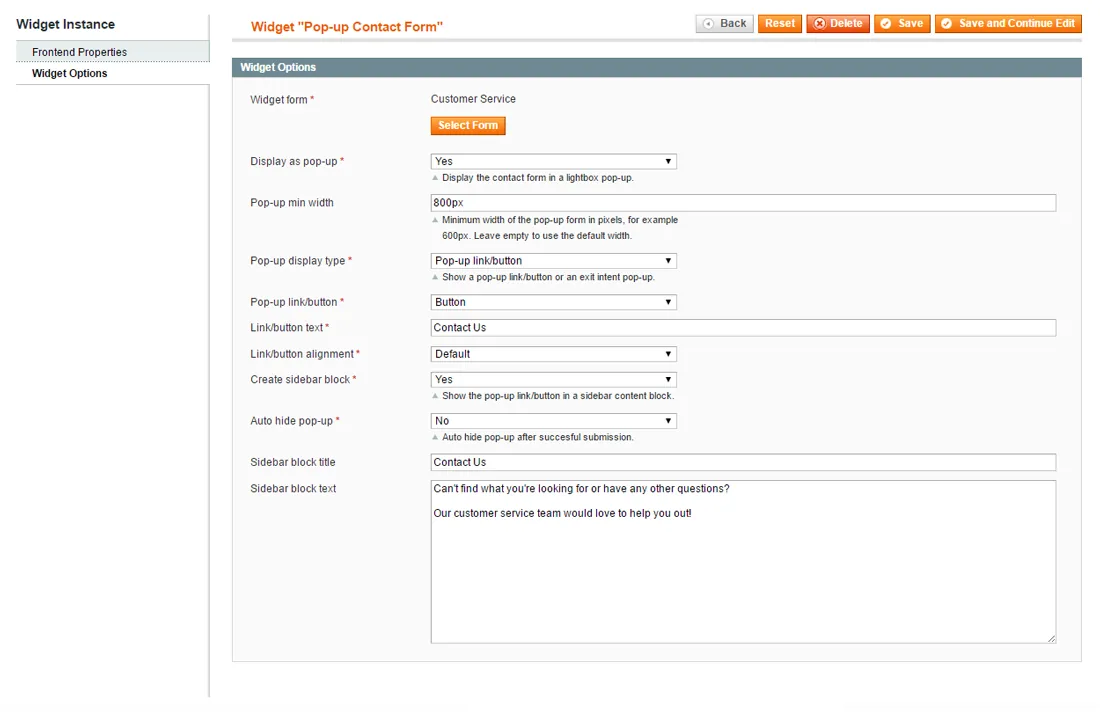
The Magento extension can automatically create a new front-end URL for each form, or you can embed your forms in CMS pages, blocks and layout templates using the custom contact form widgets.
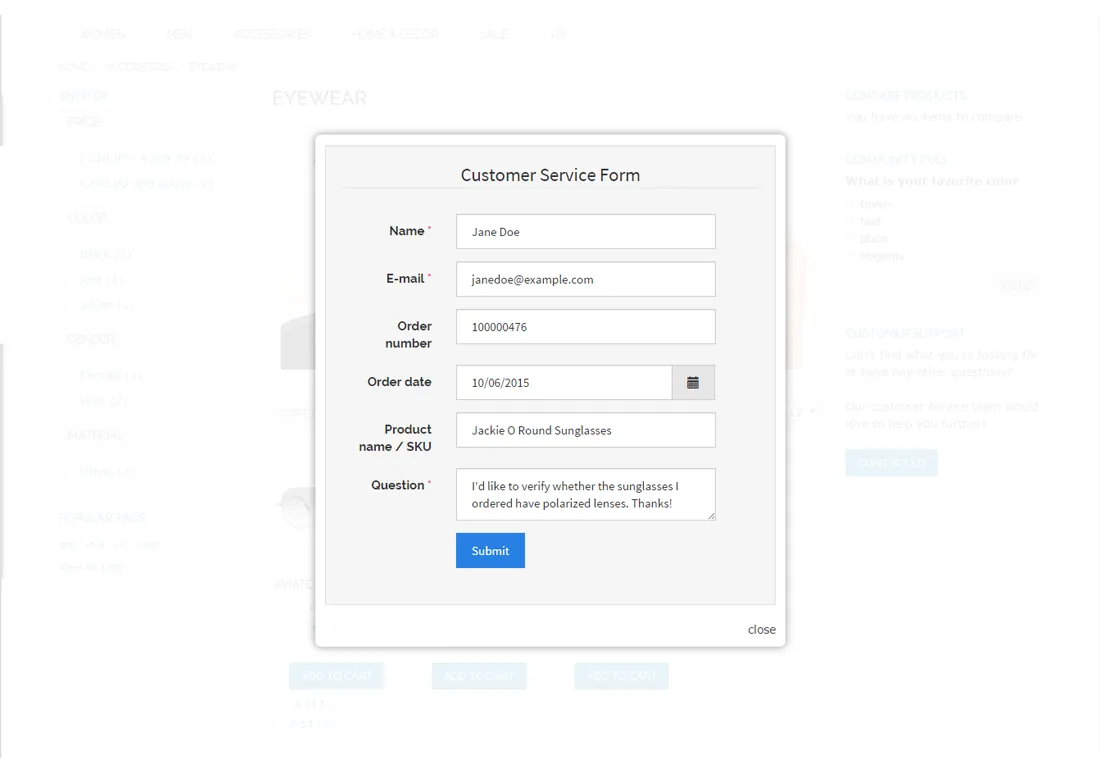
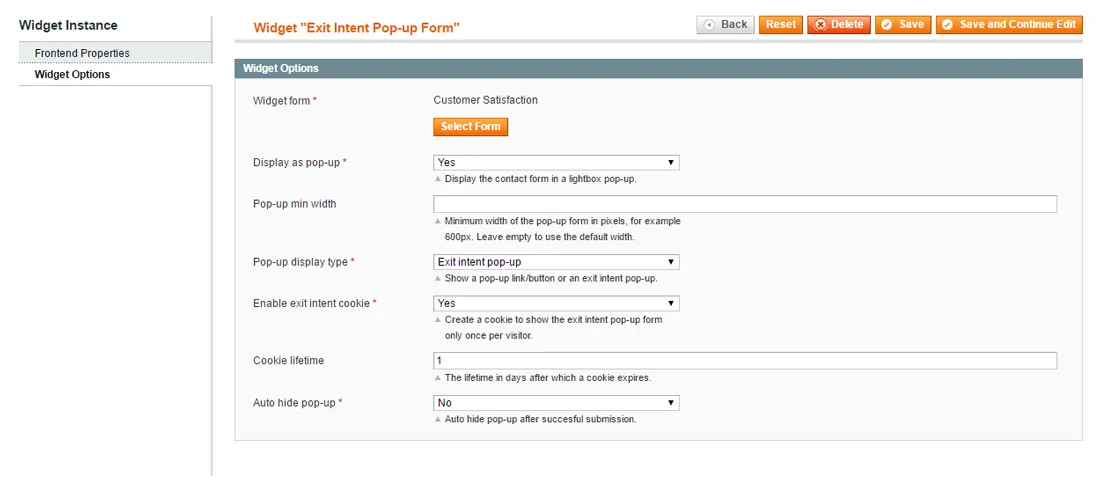
The widgets also include two options to display forms in a light-box pop-up. The pop-up form can be opened by clicking a customizable contact link or button, which can be placed anywhere in your front-end store, such as a category page side bar.
Alternatively, you can use the exit intent feature to show the pop-up form dynamically when a visitor is about to leave your website.
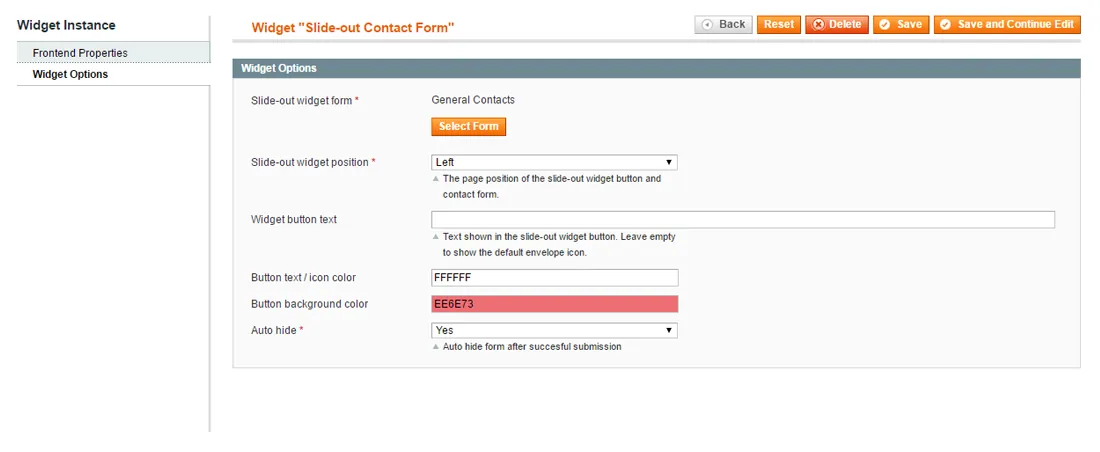
Slide-out forms#
This widget adds a slide-out form to your store, which appears from the side or bottom of the screen after clicking the customizable contact button.
The slide-out form not only gives your website a modern look, but also enables customers to contact you at any time without having to navigate to a separate contact page.
Extensive multi-page forms#
While single-page contact forms are suitable for almost any purpose, a multi-page layout provides a good fit for more extensive forms with lots of input fields.
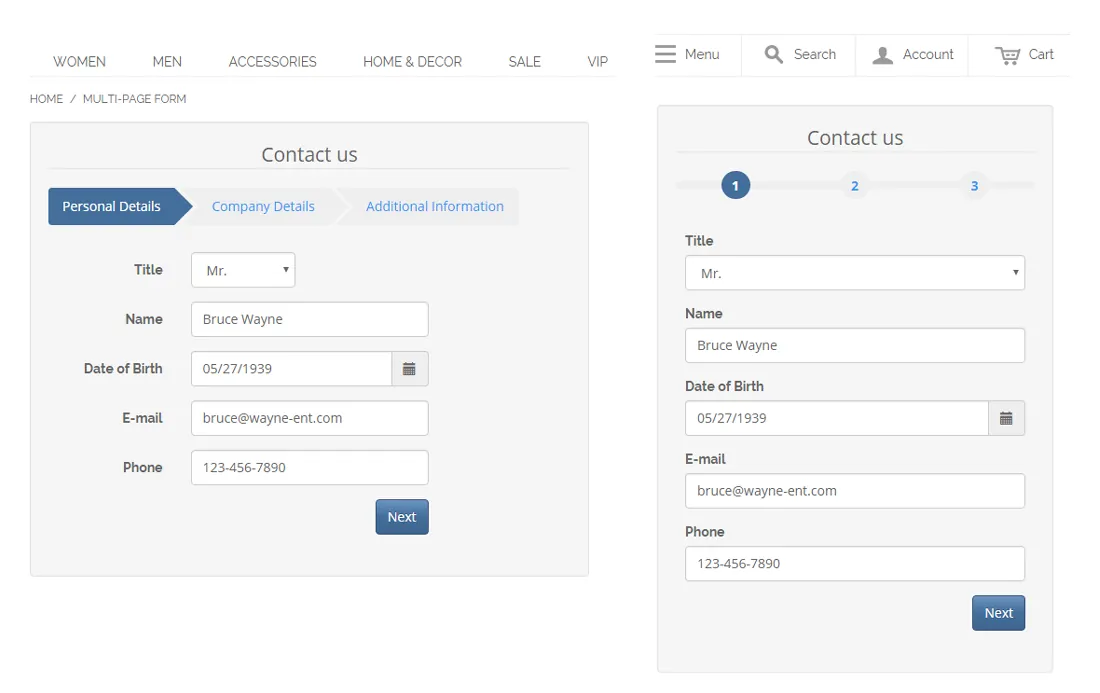
Using the Magento extension you can create multi-page forms yourself by inserting the form page component on any desired place in your contact form, dividing it into multiple pages or tabs.
The form pages can be browsed through without reloading the website, while the top navigation bar automatically adjusts to smaller resolution screens when necessary.
Multi-column forms#
Similar to building multi-page contact forms, the Custom Contact Forms Magento Extension also lets you create forms with multiple sections and columns.
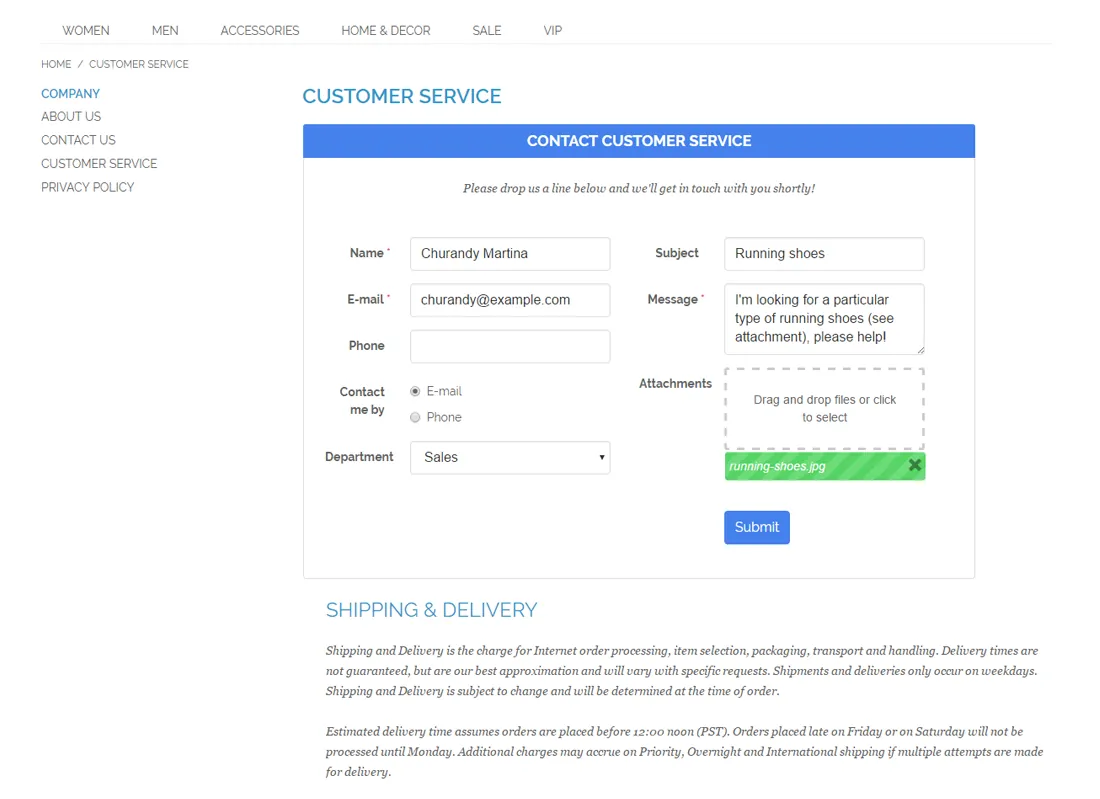
Just drag and drop the form section component into the contact form to add a new full width, one column or 2 column section.
By dividing your forms into multiple sections and columns you can make optimal use of the contact form layout and place related form fields next to each other.
Needless to say the multi-column forms are fully responsive and can be used in combination with any other display option, such as the multi-page, pop-up or slide-out form.
Pre-fill forms with customer, product and category data#
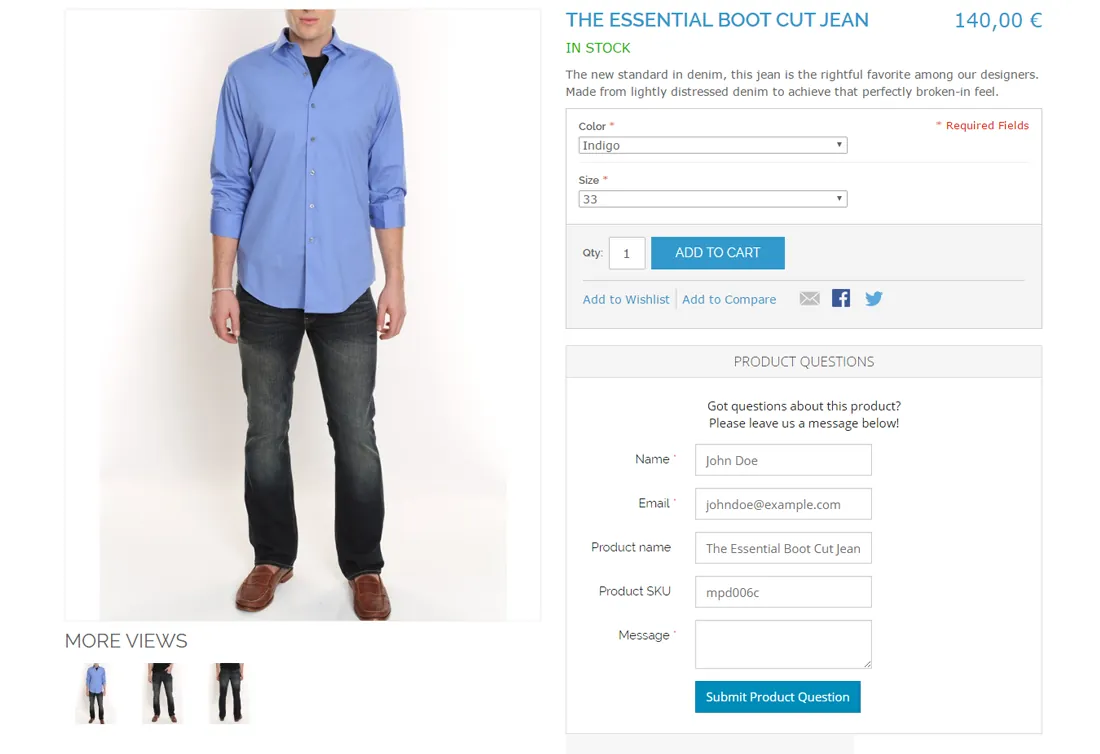
Another great feature of the Magento extension is that you can automatically prefill your forms with default values or variables related to customer, category, product, address and store details.
In this way you can pre-fill forms for logged in customers with their name and e-mail address, or automatically prefill product question forms on product pages with attributes such as product name and SKU.
Prefilling forms with certain data will not only save your customers time, but also help your admin users, who will be automatically provided with all information they need.
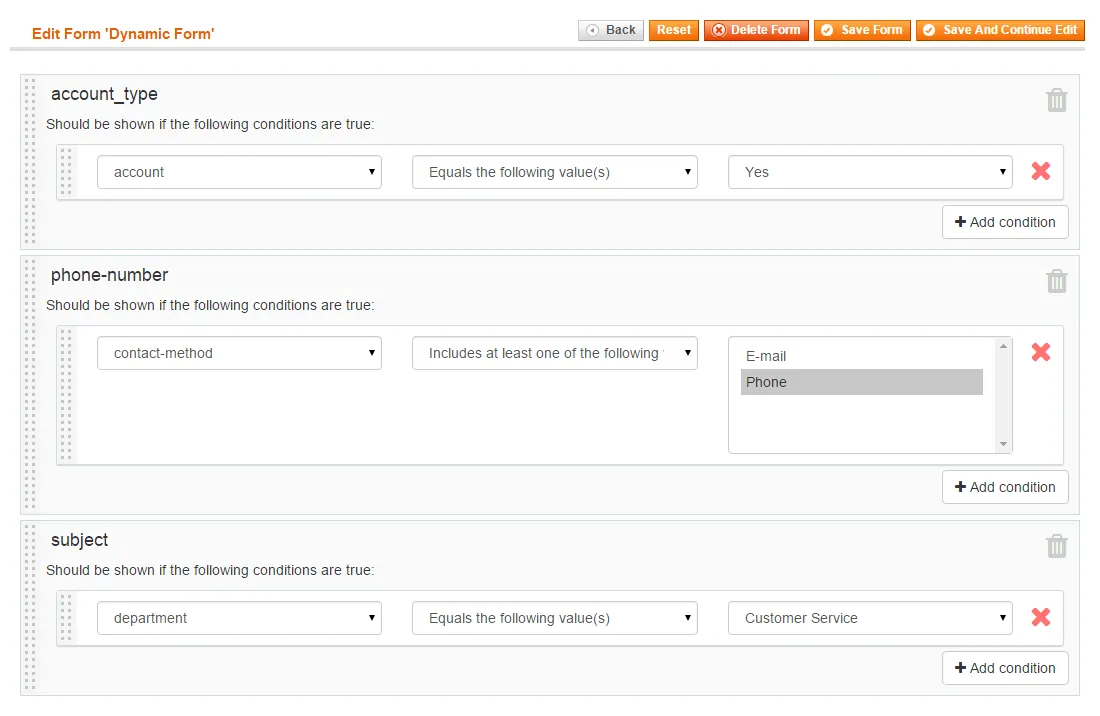
Dynamic forms with conditional fields#
The extension also includes a conditional form fields feature, enabling you to configure form components that appear dynamically on the front-end based on specified conditions.
This dynamic form builder functionality lets you create advanced multi-purpose forms for Magento by making the appearance of form fields dependent of the customer's input.
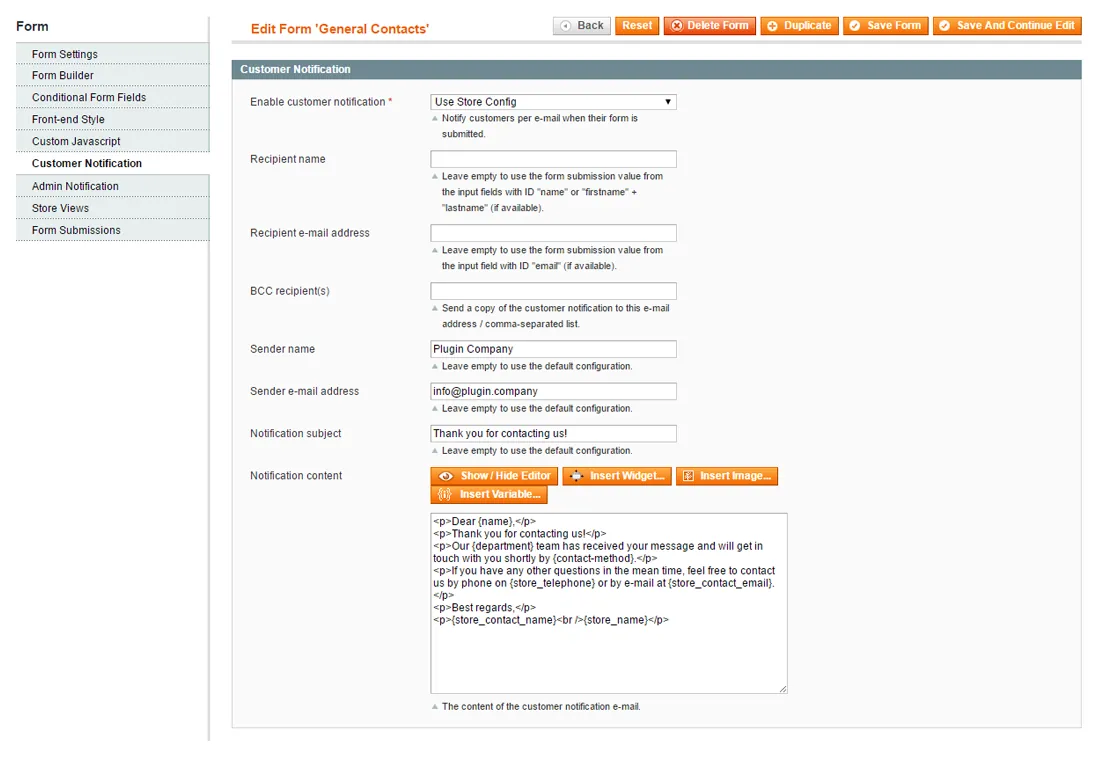
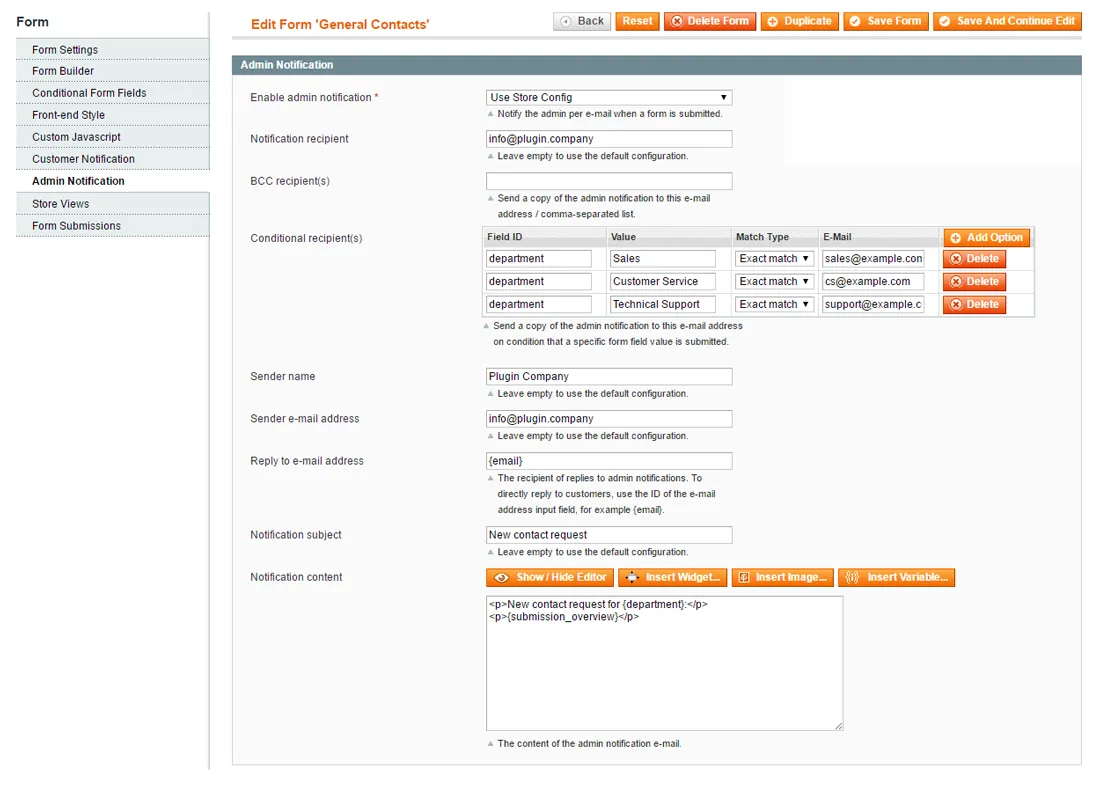
Fully customizable e-mail notifications#
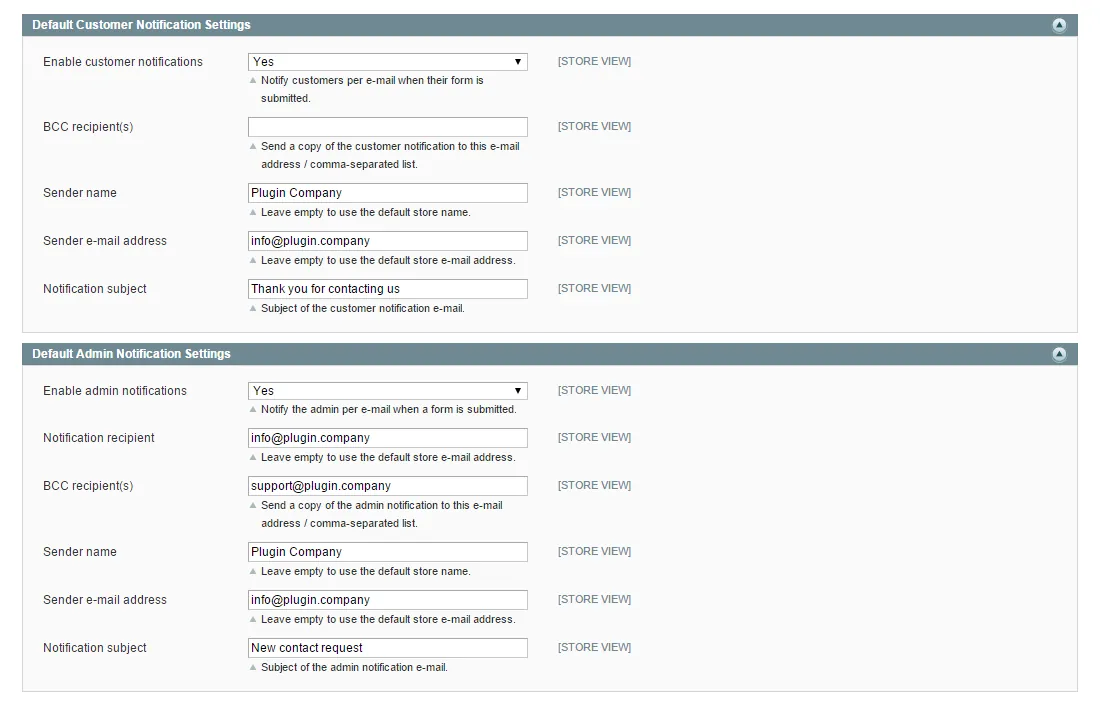
Magento Custom Contact Forms comes with a full-fledged e-mail notification system to notify your customers and admin users when a new contact request has been submitted.
Use the default notification settings for all your contact forms or configure the customer and admin notifications for each form separately.
By inserting custom variables in the e-mail content you can automatically include any submitted form data in your notifications. Using the extension it's even possible to set up conditional admin e-mail recipients based on the contact form submissions.
Back-end form submission management#
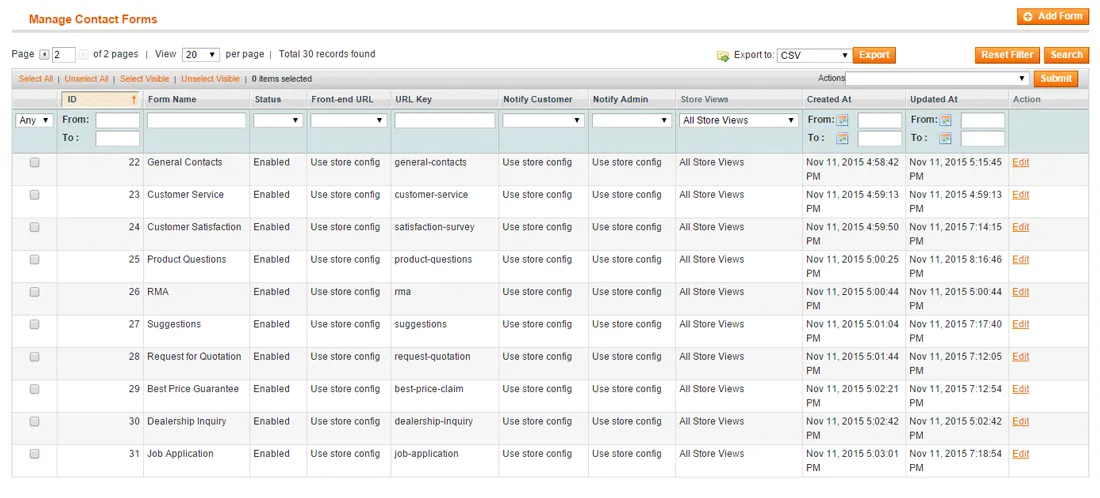
The extension also makes it possible to conveniently save and manage your contact form submissions directly in the Magento Admin Panel, which includes an overview of all submitted form data and a copy of the admin and customer notifications.
To enhance your form data management, you can modify the status of each form submission, assign a custom ID prefix and optionally add comments in the back-end. On top of that you can export all submitted form data to CSV or Excel.
Key Features#
- Drag & Drop Interface — Drag & drop contact form builder
- Many Form Components — Wide selection of customizable form fields
- 18 Bootstrap Themes — Choose from 18 front-end themes
- Various Form Wrappers — Combine your theme with one of six form wrappers
- Responsive Design — Works on all devices and screen resolutions
- 100% AJAX front-end — No need to reload pages when submitting forms
- Form validation — Automatically check the format used in input fields
- Captcha Integration — Optional reCaptcha & Visual Captcha spam protection
- File Upload Support — Includes form upload field for attaching files
- Contact Form Pages — Automatically create custom contact form pages
- Easy Form Embedding — Insert your contact forms anywhere using widgets
- Pop-up Contact Forms — Display your form in a light-box pop-up
- Multi-page Forms — Divide your forms into multiple tabs or pages
- Multi-column Forms — Add sections and columns to forms
- Dynamic Forms — Create advanced forms with conditional form fields
- Prefilled forms — Automatically prefill forms with variables
- Custom Notifications — Email notification system with custom variables
- Conditional e-mails — Configure conditional admin notification recipients
- Custom CSS — Style form fields using custom CSS classes
- Form Submissions — Optionally save form submissions in the back-end
- Export form data — Export form submissions to CSV & Excel
- Unlimited forms — Create as many custom forms as you want
- Ease of use — Build any type of form without any coding skills.
Documentation
25 pages from the user manual.
Changelog
Release history93 releases, Oct 2014 – Apr 2020
Since 2026Open source
- Unreleased
Security hardening: the admin download of form submission uploads now only serves files from the media/pccf_uploads/ folder. Before, any logged-in admin user could download any file the web server can read.
- 1.21.2
Fixed "Invalid method isCustomerLoggedIn" error which occurred when viewing a contact form CMS widget instance. (Issue was introduced in version 1.21.0)
- 1.21.1
Fixed issue causing all form submission comment timestamps to be off several hours when not using GMT locale
- 1.21.0
- Added customer_logged_in condition to conditional fields section, which allows showing / hiding fields based on customer login status.
- Improved conditional fields conditions logic and descriptions.
- Added
{{var xxx}}notation support to notification e‑mail content. (Both{xxx}and{{var xxx}}are now supported.) - Added support to
{{include ..}}shortcode in notification e‑mail. Allowing e‑mail templates to be used.
- 1.20.4
Fixed captcha not being loaded issue which occurred when multiple forms with different captcha settings were placed on a single page
Show 89 older releases
- 1.20.3
Fixed issue where inline pop-up form link would split the paragraph text it's placed in
- 1.20.2
Removed logging statement
- 1.20.1
Fixed conditional field checkbox 'does not contain' issue
- 1.20.0
Added option to include or exclude the visitor IP address in form submissions
- 1.19.4
Additional fix for Infortis theme
- 1.19.3
Popup form compatibility fix for Infortis theme
- 1.19.2
- Forms on dedicated form page are now automatically centered
- Added custom CSS class to popup form buttons and links, allowing custom styling
- 1.19.1
Fixed issue related to conditional form fields staying disabled after being shown
- 1.19.0
- Form components are now 'sticking' in the users screen when scrolling down, making them more easily accessible
- Added help text for some fields in form builder, including ID fields and multi-select option fields
- Added support for email template directives (header, footer etc) in e‑mail notifications
- 1.18.1
- Fixed nested conditional form fields issue
- Fixed required conditional checkbox validation issue
- Fixed issue where conditional form field value was lost when disabled / hidden
- 1.18.0
- E‑mail notification submission overview table now uses field labels instead of IDs
- Fixed issue where form wouldn't submit if reCaptcha wasn't checked on first try
- 1.17.6
Fixed ReCaptcha related issue which was caused by changes in external library
- 1.17.5
Fixed file upload issue introduced in version 1.17.4
- 1.17.4
- Fixed file upload issue on IOS Safari
- Improved file upload error reporting
- 1.17.3
Removed some debugging code
- 1.17.2
Fixed nested conditional form field issue. Conditional form fields which are disabled are now automatically reset to their default value
- 1.17.1
Required form field red star position fix for small screens < 990px
- 1.17.0
- Added option to enable focus on first field per form
- Fixed issue where focussing on first field didn't work in some cases
- Responsive fix for bottom left / right slideout forms
- 1.16.10
Ultimo theme pop-up style improvement
- 1.16.9
- Fixed issue which allowed to submit a form multiple times when clicking the submit button repeatedly
- Added alt text for gears loading image
- 1.16.8
Bug fix for issue regarding saving of forms introduced in version 1.16.6
- 1.16.7
Added option to allow all extension types in upload field by leaving allowed extensions blank
- 1.16.6
- Magento 1.4.x compatibility fixes
- Code improvements
- 1.16.5
Submissions CSV export special characters bug fix
- 1.16.4
un-minified codemirror library for compatibility with Fooman Speedster
- 1.16.3
Bug fix for special characters while exporting form submissions
- 1.16.2
- Fixed conditional form fields bug
- Fixed get request empty form submissions bug
- 1.16.1
Added css classes field for appended textfield
- 1.16.0
- Small admin area improvements
- Improved 2 column form design
- Added translation CSV file
- 1.15.0
- Added custom CSS field for each form
- Added option to add custom CSS class to form wrapper
- Added on page load custom JS field
- Added before form submit custom JS field
- 1.14.4
Added custom methods to prefill form with formatted product price variables
- 1.14.3
Fixed small bug regarding utf8mb4 characters being used in form submissions
- 1.14.2
Excess white space is now trimmed from input fields before submitting a form
- 1.14.1
- Fixed colorbox issue with newest Google Chrome browser version
- Renamed head.js library global variable for compatibility with some third party scripts
- 1.14.0
- Added possibility to notify customers when form submission comment has been added
- Added auto hide form on submission option for widgets
- Added scroll to top of form after submission functionality
- Added copy / duplicate form functionality
- 1.13.3
Added support for CMS widget shortcodes inside form
- 1.13.2
- Fixed various bugs
- Fixed php7 compatibility
- 1.13.1
Fixed some minor bugs
- 1.13.0
Added option to prefill dropdown menus and list boxes with customer's invoice and order IDs
- 1.12.1
Fixed issue regarding slide-out form bottom left/right margin
- 1.12.0
Added visitor IP variable
{visitor_IP}to form submissions - 1.11.4
Fixed some notice and warning level errors
- 1.11.3
- Fixed mobile file upload issue
- Fixed multiple upload fields validation display issue
- 1.11.2
Fixed issue regarding Bootstrap JS and Visual Captcha in conjunction with RequireJS
- 1.11.1
- Fixed bug regarding form not being submitted when embedded in a product page (introduced in v1.11.0)
- Added form URL to default form submission entry parameters list
- Disabled loading of reCaptcha library if it isn't used
- 1.11.0
- Added option to create multi-column contact forms and form sections
- Added option to automatically prefill input fields using default values and variables
- Added option to preselect default value of radios, checkboxes, dropdown menu and list box
- Added custom CSS class option to form component settings
- Added file upload component to conditional form fields
- Added 24 hour notation to time selection field
- Empty conditional form field data is now hidden from admin notification emails
- Fixed 'header already sent' warning error
- Fixed spam assassin issue
- 1.10.1
Fixed required file upload field bug
- 1.10.0
- Fixed empty form submission issue
- Fixed required checkboxes selection bug
- Fixed multi-page form height issue related to conditional form fields
- Fixed installer compatibility with Magento Community editions up to 1.6
- Enabled CMS widget / variable processing in front-end success messages
- 1.9.1
Fixed issue regarding widget chooser permissions
- 1.9.0
Added exit intent pop-up form functionality
- 1.8.3
Fixed pop-up resizing issue regarding forms with conditional fields and input validation
- 1.8.2
Fixed form submission comment saving issue
- 1.8.1
Fixed form saving bug introduced in v1.8.0
- 1.8.0
- Added comment functionality for form submissions
- Added option to change the status of form submissions
- Added configurable form submission ID prefix option in Form Settings tab
- 1.7.0
- Added match type selection to conditional admin recipient settings
- Added form URL variable for configuring conditional admin recipients
- 1.6.1
- Fixed small issue regarding compatibility with old jQuery versions
- Reply to e‑mail address of admin notification e‑mail now defaults to the customer address
- Fixed a bug in the drag & drop form builder
- 1.6.0
- Added conditional recipient to admin notifications
- Added configurable reply to e‑mail address to admin notifications
- Improved multi-page form design for mobile
- Improved slide-out form design for mobile
- Fixed pop-up form min width issue
- Added conditional paragraph text and headers
- Added maximum days limit to date range field
- From date in date range field is grayed out by default
- Added newsletter subscription check-box
- Changed the upload field color for completed file uploads
- Fixed reCaptcha issues
- Added Visual Captcha translation support
- Fixed form loading issue when custom Bootstrap theme is selected
- 1.5.2
Fixed form builder display bug for 1200px screen resolution
- 1.5.1
- Small bug fix
- Increased vertical margin of multi-page form pagination
- 1.5.0
- Fixed pop-up multi-page form resizing bug
- Added option to define minimum width for pop-up form
- 1.4.7
Fixed small notice error
- 1.4.6
- Fixed multiple select and checkbox bug during form submission
- Fixed compatibility issue with Syntax Highlighter extension
- 1.4.5
Fixed secure URL issue: extension checks if current URL is secure now before using secure URL
- 1.4.4
Fixed conditional field issue with older jQuery versions
- 1.4.3
Fixed issue when notice level error reporting is enabled
- 1.4.2
Improved IE8 compatibility on front-end
- 1.4.1
Fixed form page creation bug in form builder
- 1.4.0
- Added conditional form fields functionality
- Improved placeholder text display
- Added required option to radios and drop-down component
- Added customizable upload field text and required option
- Added option to delete uploaded files
- Added arbitrary Javascript field for form submissions
- Fixed compatibility issue with custom mailing / SMTP extensions
- Fixed back-end resizing bug
- 1.3.4
Small bug fix regarding upload field in combination with old jQuery version
- 1.3.3
Added support for secure URL (https)
- 1.3.2
- Fixed BCC notification issue
- Fixed colorbox issue
- 1.3.1
- Fixed date picker positioning issue
- Fixed minor display bugs
- 1.3.0
- Added multi-page form functionality
- Re-sized multi-page colorbox and multi-page slide-out form
- Added multiple event hooks for developers
- Small bug fix
- 1.2.6
Fixed bug regarding customer e‑mail and customer name variable
- 1.2.5
Fixed backwards compatibility Captcha
- 1.2.4
Fixed Magento 1.4 compatibility
- 1.2.3
Security update .htaccess uploads
- 1.2.2
Fixed slide-out form text rotation for safari
- 1.2.1
Added back-end form submissions save & export functionality
- 1.1.3
- Added RTL, special character and UTF-8 e‑mail support
- Added Form URL variable for e‑mail notifications
- 1.1.2
- Fixed shoplift bug compatibility
- Fixed slide-out resize issue
- 1.1.1
- Improved slide-out widgets and pop-up widget
- Improved file upload and visual captcha CSS
- Updated to new Google ReCaptcha 2.0
- Fixed issue with multiple captchas
- Updated jQuery & Bootstrap libraries
- Improved some minor front-end theme features
- 1.1.0
- Added slide-out contact form widget
- Added Visual Captcha integration
- Updated Google ReCaptcha integration
- Added file upload form component
- Added date, time and date range selection components
- Improved form builder layout
- 1.0.5
Minor bug fix for multiple forms on the same page
- 1.0.4
- Form title now used for page title
- Fixed installer table prefix bug
- 1.0.3
- Improved widget functionality
- Fixed FireFox bug in admin area
- 1.0.2
- Changed widget functionality
- Fixed front-end IE8 compatibility
- 1.0.1
- Updated grid view and changed column names to fit low resolution screen
- Changed height of default success alert
- Added store config values
- Moved jQuery library
- Improved widget support
- Fixed ACL issue
- Fixed text area and pop-up form width issue
- 1.0.0
First release of Magento Custom Contact Forms extension by Plugin Company.
More for Magento 1
-
Product Questions
Question and answer panel for Magento product pages.
-
Product Page PDF
Lets customers download a PDF version of your Magento product pages.
-
Newsletter Pop‑up
Animated newsletter subscription pop‑up for Magento.
-
Syntax Highlighter
Syntax highlighting for HTML, CSS and JavaScript in the Magento admin.